
Setting up a living room around a TV involves more than just mounting a screen and pointing a couch at it. The right layout balances viewing comfort, traffic flow, and furniture function, while keeping the space from feeling like a home theater at the expense of conversation or flexibility. Poor placement leads to neck strain, glare issues, and awkward sight lines. Good placement creates a natural gathering spot that works for movie nights and everyday use. This guide covers practical strategies for TV positioning, viewing distances, furniture arrangement, and lighting that help homeowners maximize both function and comfort in rooms of any size or shape.
Table of Contents
ToggleKey Takeaways
- The ideal living room layout with TV balances viewing comfort, traffic flow, and furniture function by anchoring the TV on a shorter wall in rectangular rooms and using proper mounting height at 40–50 inches from the floor.
- For a living room layout with TV, calculate viewing distance as 1 to 1.5 times the screen diagonal for 4K TVs (e.g., 65-inch TV at 5.5–8 feet) and increase to 1.5–2.5 times for 1080p screens to avoid pixel visibility.
- Arrange primary seating in a U-shape or L-shape facing the TV while maintaining at least 30 inches of walkway width, and float furniture 12–24 inches off the back wall in larger rooms to create intentional flow.
- Position ambient lighting indirectly with dimmer switches, add bias lighting behind the TV to reduce eye strain, and avoid placing lamps where they reflect on the screen to eliminate glare during viewing.
- Avoid mounting TVs above fireplaces or on drywall alone—use studs or appropriate anchors—and prevent common mistakes like undersized rugs, blocked vents, or overcrowded furniture that compromises navigation and comfort.
- In open-concept spaces, treat the TV wall as a room divider using a peninsula wall or low bookshelf to define the living zone, and orient the screen away from dining tables to avoid competing visual focal points.
Best TV Placement Options for Every Living Room Shape
Room shape dictates TV placement more than personal preference. In rectangular living rooms, the TV typically works best on one of the shorter walls, centering it in the narrowest dimension to minimize viewing distance and maximize seating options. This keeps viewers from sitting too far back and allows furniture to flank the screen without crowding walkways.
Square rooms offer more flexibility but require careful planning to avoid placing the TV where it competes with windows or doorways. A corner placement can work in smaller square rooms (under 12×12 feet), using an articulating mount or corner media console to angle the screen toward the primary seating area. This frees up wall space for other furniture but limits seating to one main viewing zone.
Open-concept spaces benefit from treating the TV wall as a room divider. Instead of pushing the TV against an exterior wall, consider mounting it on a peninsula wall or low bookshelf unit that defines the living zone from the dining or kitchen area behind it. This approach works well in layouts where the “living room” is just one part of a larger great room.
Avoid placing TVs opposite windows unless blackout treatments or high-brightness screens (500+ nits) are in the budget. Even indirect daylight creates glare that washes out picture quality during daytime viewing. If window-opposite placement is unavoidable, plan for cellular shades or curtains that close completely.
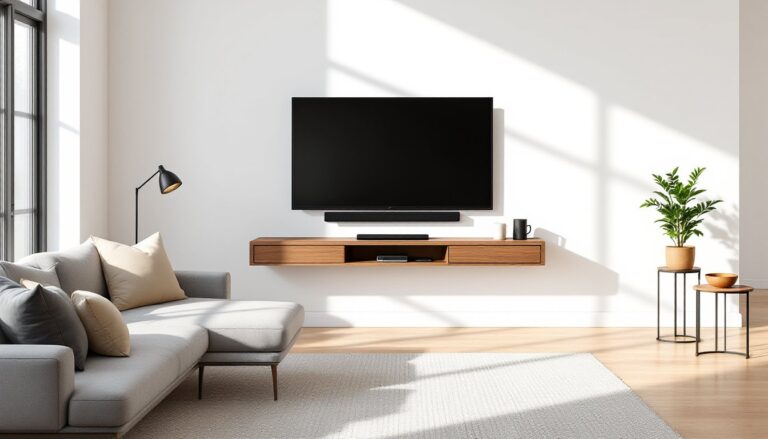
Height matters as much as wall choice. The center of the screen should sit at seated eye level, generally 40 to 50 inches from the floor for standard seating. Mounting too high (a common mistake above fireplaces) forces viewers to crane their necks and leads to discomfort during longer viewing sessions.
How to Determine the Perfect TV Viewing Distance
The ideal viewing distance depends on screen size and resolution. For 4K TVs, the rule of thumb is to sit 1 to 1.5 times the screen’s diagonal measurement away. A 65-inch 4K TV works well with seating 5.5 to 8 feet back. For 1080p screens, increase that to 1.5 to 2.5 times the diagonal to avoid seeing individual pixels.
Measure from the screen to the front edge of the primary seating, not to the back wall or center of the room. In rooms where the couch must sit farther back due to traffic flow or room size, consider upsizing the TV rather than asking viewers to squint. A 75-inch screen at 9 feet provides a better experience than a 55-inch at the same distance.
Viewing angle also impacts comfort. Seats positioned more than 30 degrees off-center from the screen suffer from color shift and reduced contrast, especially on older LCD panels. OLED and high-end LED models handle wider angles better, but direct, centered viewing still delivers the best picture.
Account for furniture depth when planning. A deep sectional or reclining sofa adds 3 to 4 feet of floor space compared to a standard sofa, pushing viewers farther from the screen. If the room’s depth is fixed, this may require a larger TV or a wall-mounted installation that reclaims a few inches compared to a media console.
Furniture Arrangement Strategies Around Your TV
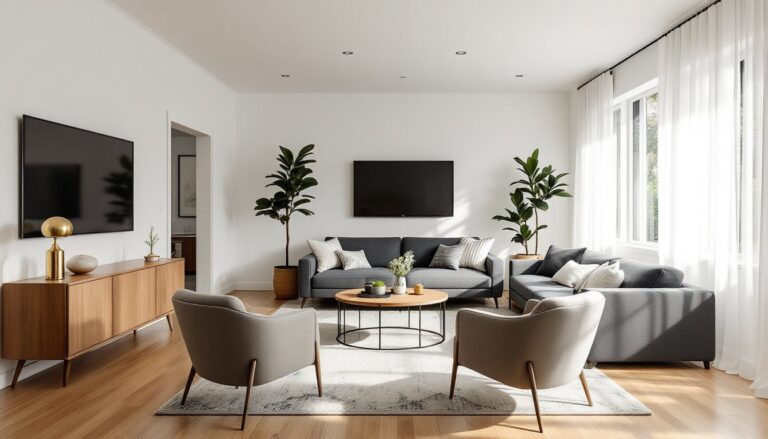
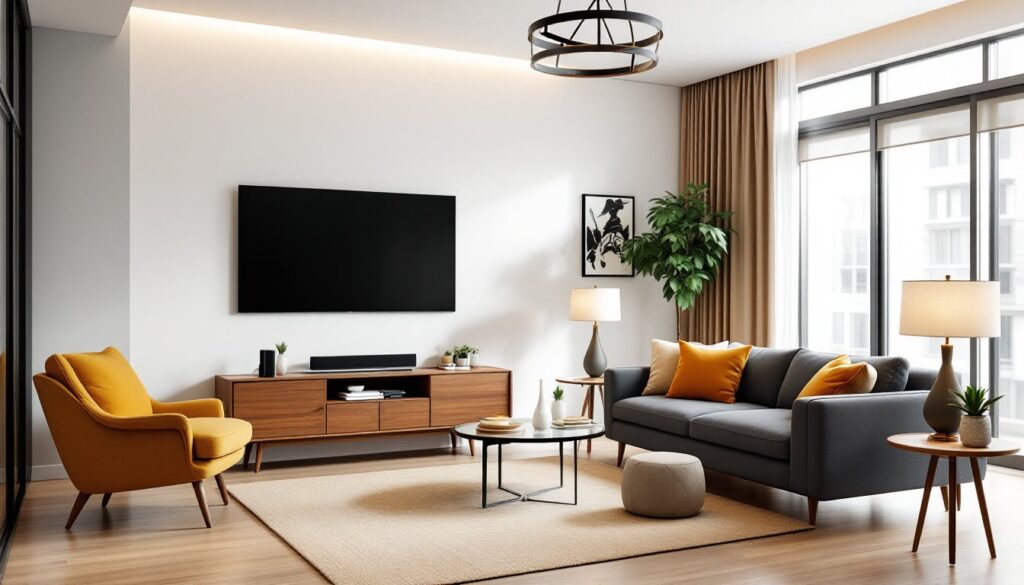
Start with the TV wall as the anchor, then build seating zones outward. The primary seating piece, usually a sofa, should face the TV directly, with additional chairs or loveseats angled slightly inward to create a conversational U-shape or L-shape. This layout supports both TV watching and face-to-face interaction without requiring furniture to be moved.
Avoid pushing all furniture against the walls in larger rooms. Floating a sofa 12 to 24 inches off the back wall creates a subtle walkway or space for a console table and makes the room feel more intentional. In smaller rooms (under 150 square feet), wall-hugging arrangements maximize open floor space, but the sofa should still maintain proper viewing distance.
Plan for side tables and surfaces within arm’s reach of every seat. End tables flanking a sofa or a coffee table centered in front provide landing spots for remotes, drinks, and devices without cluttering the media console. Keep the coffee table low, 16 to 18 inches high, to avoid blocking sightlines to the screen.
Consider traffic flow through the room. Major walkways should be at least 30 inches wide, and the path from entry to other rooms shouldn’t cut directly between the TV and primary seating. If the main door opens into the TV viewing zone, angle seating slightly or use an area rug to visually separate the circulation path from the seating area.
Seating Layouts That Maximize Comfort and View
Symmetrical arrangements work well in formal or traditional spaces. Two identical sofas facing each other with the TV on one end wall create balanced sightlines, though one sofa will always have the better view. Pairs of chairs flanking a centered sofa provide more flexible seating without the bulk of a sectional.
L-shaped sectionals fit well in corners and offer ample seating for families or frequent hosts. Position the chaise end farther from the TV, viewers on the chaise sit at a sharper angle but can still see the screen comfortably if the sectional isn’t oversized for the room. For rooms 12 feet wide or less, a standard three-seat sofa often works better than a sectional to avoid overwhelming the space.
Recliners and media chairs should sit slightly closer to the TV than stationary seating since users recline back, effectively increasing viewing distance by a foot or more. If incorporating recliners, ensure there’s 3 feet of clearance behind them when fully extended, a common oversight that leaves recliners unusable or blocking walkways.
Creating Functional Zones in TV-Centered Living Rooms
Not every living room needs to be 100% TV-focused. Multi-use layouts benefit from defining separate zones for media, conversation, and hobbies. Use an area rug under the seating group to anchor the TV zone, then place a pair of accent chairs and a small side table in another part of the room for reading or conversation. This approach works especially well in larger living rooms (over 250 square feet) where a single furniture grouping feels sparse.
Shelving units and low bookcases make effective visual dividers without blocking light or sightlines. A 30- to 36-inch tall bookshelf behind a sofa can separate the TV zone from a desk or play area in an open layout. Keep the shelves open rather than backed to maintain a sense of flow.
In combined living-dining spaces, orient the TV away from the dining table to keep meals from competing with the screen. If the TV is visible from the dining area, consider a lift cabinet or framed TV that disguises the screen when not in use. These cabinets add cost but maintain a cleaner look in homes where the living room serves multiple formal functions.
Plan for device storage and cable management early. Streaming boxes, game consoles, and soundbars need ventilated shelf space and accessible power. Surface-mounted cable raceways or in-wall conduit (which may require cutting drywall and fishing wires) keep cords hidden. For renters or those avoiding wall cuts, a media console with a back panel cutout and built-in cable channels offers a cleaner look than loose cords.
Lighting Solutions That Reduce Glare and Enhance Viewing
Ambient lighting should be adjustable and indirect. Overhead fixtures directly above or in front of the TV create reflections on the screen, especially on glossy panels. Install dimmer switches on ceiling lights to lower output during viewing, or use floor lamps and table lamps with shades that direct light upward or to the sides.
Bias lighting, a soft backlight behind the TV, reduces eye strain by minimizing the contrast between the bright screen and dark wall. LED strip lights mounted on the back of the TV or media console provide subtle illumination without creating glare. Choose warm white or tunable strips (2700K to 3000K) for evening viewing: cooler temperatures feel harsh in living spaces.
Avoid placing lamps or sconces where they reflect in the screen. Test lighting positions by turning on the TV with a dark or black image and checking for visible reflections from different seating spots. Adjust lamp placement or switch to shaded fixtures that contain the bulb rather than exposed Edison-style bulbs that create bright point sources.
Blackout or light-filtering window treatments are essential for rooms with windows on the same wall as the TV or directly opposite. Cellular shades and roller shades offer clean lines and full coverage, while curtains provide a softer look. Motorized options add convenience for hard-to-reach windows or tech-integrated homes but aren’t necessary for most DIY layouts.
Common TV Layout Mistakes to Avoid
Mounting the TV too high is the most frequent layout error. Above-fireplace installations look tidy but force viewers to look up, causing neck strain. If a fireplace mount is unavoidable, use a pull-down mount that lowers the screen to proper eye level during use, or plan for seating that reclines to offset the upward angle.
Ignoring stud locations leads to unsafe mounts or last-minute layout changes. Use a stud finder to locate framing before committing to a TV position. If studs don’t align with the desired centering, use a mounting plate that spans multiple studs or toggle bolts rated for drywall (though studs are always preferable for screens over 40 inches). Never mount a TV on drywall alone, even heavy-duty anchors aren’t safe for the dynamic load of a tilting or swiveling screen.
Undersized rugs make seating groups feel disconnected. An area rug should extend at least 6 inches beyond the front legs of sofas and chairs, ideally, all front legs sit on the rug. In smaller rooms, a 5×7 or 6×9 rug may be too small: an 8×10 typically works better for standard living room furniture groupings.
Blocking vents or outlets with furniture creates functional headaches. Before finalizing a layout, check the locations of HVAC registers, electrical outlets, and cable/ethernet jacks. A sofa pushed over a floor vent reduces airflow and efficiency, while blocking the only nearby outlet forces extension cords across walkways, a trip hazard and code issue in some jurisdictions.
Overcrowding the room with oversized furniture is common in TV-focused layouts. A massive sectional might offer plenty of seating, but if it leaves less than 30 inches for walkways or forces the coffee table against the TV console, the room feels cramped and difficult to navigate. Measure furniture dimensions and map the layout on paper or with painter’s tape on the floor before purchasing or arranging pieces.